
COD: Black Ops 7

CROOKED

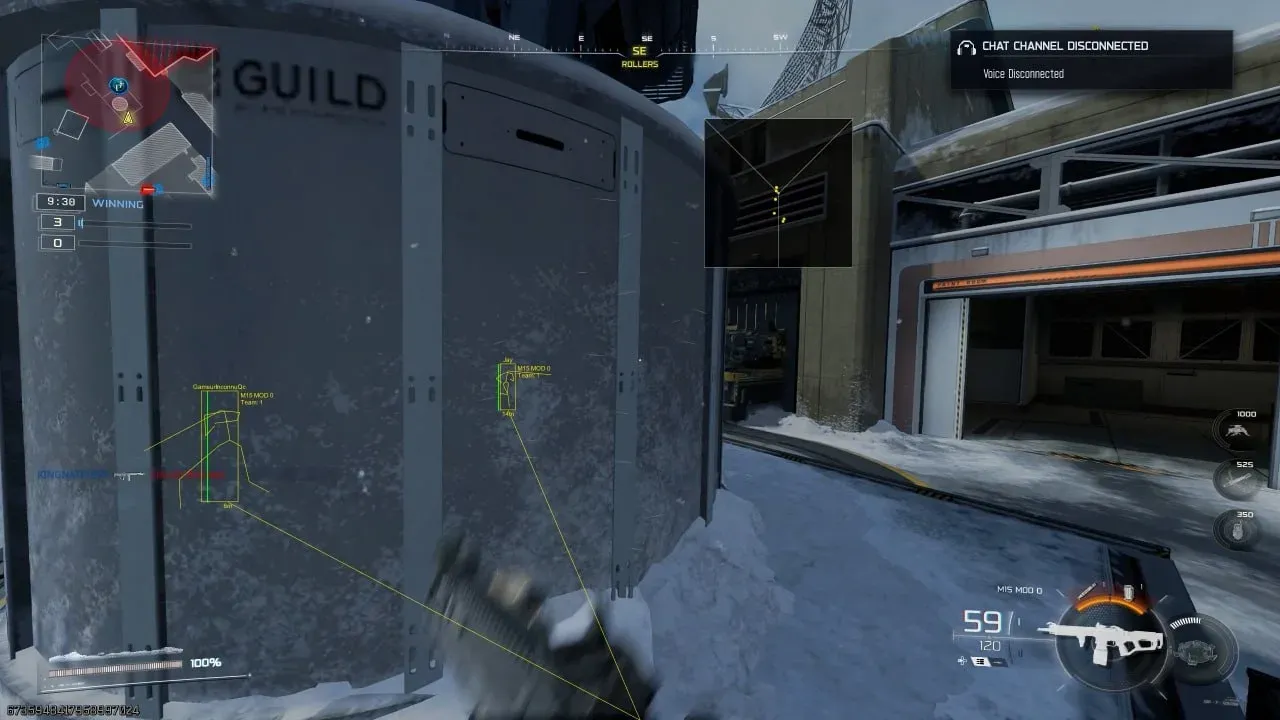
Aimbot · FOV · Radar

Overview

CROOKED · COD: Black Ops 7. Features, system requirements and available plans.

Features

Players

  • Only visible – Show only visible players
  • My team players – Show teammates
  • Name – Show player names
  • Team – Show player team
  • Health – Show player health
  • Weapon in hands – Show player’s current weapon
  • Line – Draw lines to players
  • Box 2D – Draw 2D box around players
  • Distance – Set player display distance
  • Direction of view – Show view direction
  • Skeleton – Draw player skeleton
  • Size line skeleton – Set skeleton line thickness
  • Skeleton draw distance – Set skeleton draw distance
  • Additional distance – Set additional display distance
  • Draw distance – Set overall display range

Radar

  • Show players/AI on world map & minimap – Display players and bots on big and mini-map
  • Use team color – Apply team color
  • Enable radar – Enable radar display
  • Backlight distance – Set radar detection distance
  • Size – Set radar size
  • Position by X – Set radar position on X-axis
  • Position by Y – Set radar position on Y-axis
  • Alpha – Radar transparency

Aim

  • Enable human aimbot – Enable aimbot
  • Aim at bots – Aim at bots
  • Aim at knocked players – Aim at downed players
  • Visibility check – Check target visibility
  • Lock target – Lock on target
  • Target switch delay – Target switch delay
  • AIM Preset – Predefined aiming styles (may vary depending on mouse sensitivity, PC settings, etc.)
  • Beginner – Jerky, unsteady, like a new shooter player; good for dummy bots or weak enemies
  • Intermediate – Balanced and natural; like an average skilled player
  • Pro – Cheat-like accuracy without superhuman reaction; for elite bots or strong opponents
  • Rage – Focuses on speed and accuracy
  • Custom – Unlocks all parameters (Smooth, Jitter, Inertia, etc.) for full customization
  • Distances for smooth/jitter – Set distances for smooth/jitter scaling
  • Smooth – Aiming smoothness (higher = slower and smoother aim movement)
  • (Green slider – close range, Red slider – long range)
  • Jitter – Random shake; similar to Smooth but creates live-like aim movement
  • Inertia – Higher value = smoother movement, lower value = snappier
  • Overshoot chance – Chance for the aim to overshoot the target
  • Overshoot amount – How far the aim overshoots
  • Micro pause chance – Chance of a short pause in aiming to mimic human reaction
  • Draw FOV circle – Enable visual FOV circle
  • FOV – Set aimbot FOV radius
  • Distance – Set aimbot working distance
  • Bones selection – Choose target bones (single or multiple)
  • Head
  • Neck
  • Left elbow
  • Right elbow
  • Body
  • Pelvis
  • Left knee
  • Right knee
  • Hotkey selection – Assign a key to activate aimbot (hold to use)

Loot

  • Weapons – Show weapons
  • Ammo – Show ammo
  • Tactical – Show tactical gear
  • Combat – Show combat gear
  • Support – Show ammo & armor in crates
  • Armor – Show armor
  • Money – Show money
  • Containers (Backpack, bag, crate, …) – Show containers
  • Field modification – Show field upgrades
  • Series of murders – Show cluster/precision airstrikes
  • Perks – Show perks (special abilities or bonuses)
  • Improvement – Show improvements
  • Kiosk, tablet, etc. – Show kiosks, tablets, etc.
  • Other – Show other items
  • Use item rarity color – Use item rarity color scheme
  • Display distance – Set item display distance

Colors

  • Friends color
  • Enemy bots color
  • Enemy players color
  • Knocked enemies color
  • Enemy visible color
  • Target color
  • Weapons color
  • Armor plate / Armor heavy color
  • Ammo color
  • Tactical gear color
  • Combat gear color
  • Money color
  • Survival kit color
  • Containers color
  • Kill streak color
  • Field modification color
  • Keys & keycards color

Settings

  • Key to disable loot – Set key to toggle loot display
  • Open menu key – Set key to open/close cheat menu (default: "HOME")

Misc

  • Draw active explosives, field modifications – Show active explosives and field upgrades
  • Distance – Set display distance
  • Draw vehicles – Show vehicles
  • Distance – Set vehicle display distance

Requirements

Supported game version:
STEAM & BATTLE.NET
Included spoofer:
No
Anticheat:
Game anticheat
Stream Bypass:
Yes
Supported game modes:
Windowed
Supported CPU:
Intel & AMD
Supported OC:
Windows 10 , Windows 11 (1903-25H2)