CHEATEROK / Guides
Ancient vs Fecurity for Delta Force: what to compare
Compare features, CPU support, display modes and requirements before choosing an access duration.
Compatibility comes first
Ancient lists Intel and AMD; Fecurity lists Intel only, excluding Xeon. Ancient specifies borderless mode; Fecurity lists all display modes. These are concrete product requirements, so price or the Aimbot label alone is not enough to choose. The full requirements of both variants appear below.
Radar, players and items
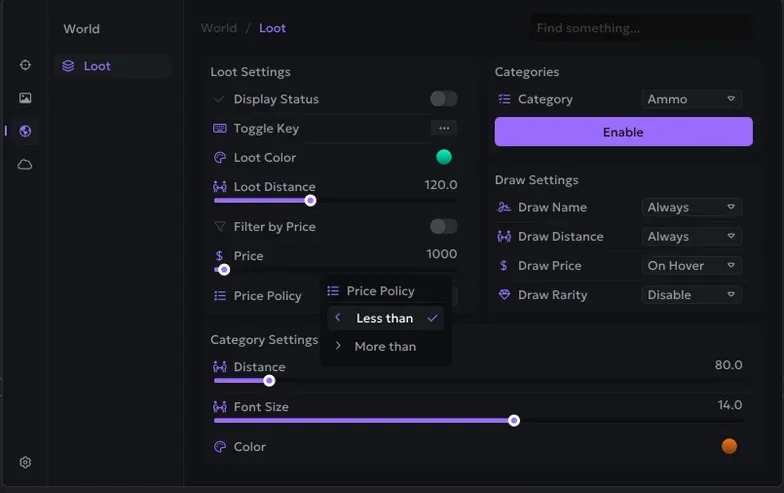
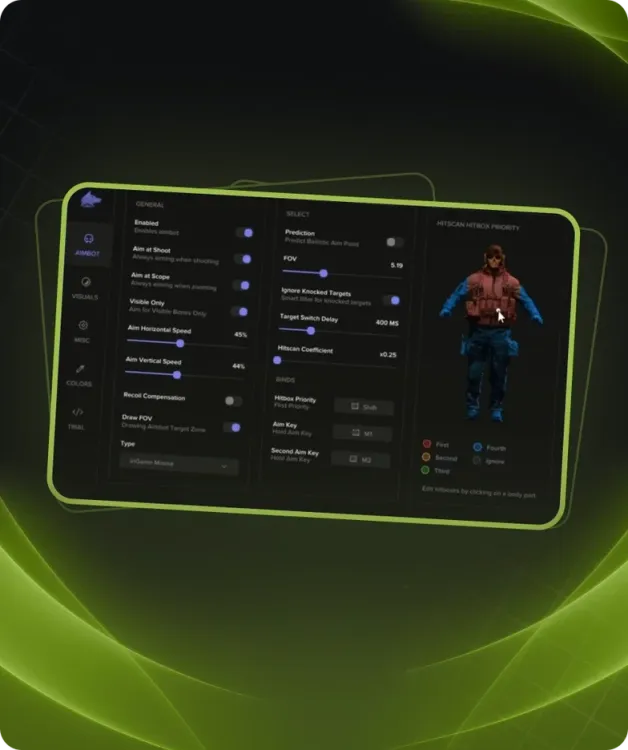
Ancient has a separate Radar section with size and player display settings, plus health, skeletons, distance and teams. Fecurity lists Loot ESP and vehicles; its aiming settings include Prediction and target-switch delay. An unlisted feature is not proof that the software lacks it. Confirm any essential feature before paying.
Check the entire configuration
These pages list opposite Secure Boot requirements, and Fecurity also specifies GPT and UEFI. Do not assume one product’s settings apply to the other. Match Windows, CPU and every additional condition to the exact product page. Then compare available durations: the subscription duration does not change the listed system requirements.
Requirements listed for each product
ANCIENT DELTA FORCE
- Additional requirements:
- Enable virtualization , secure boot. Disable hyper-v , integrate gpu for laptop
- Included spoofer:
- No
- Anticheat:
- ACE
- Stream Bypass:
- Yes
- Supported game modes:
- Borderless
- Supported CPU:
- Intel & AMD
- Supported operating systems:
- Windows 10 1903 and all newest, Windows 11
Fecurity DELTA FORCE
- Additional requirements:
- Disable secure boot and TPM, BIOS needs UEFI mode
- Supported disk:
- Only GPT (we dont support MBR)
- Included spoofer:
- No
- Anticheat:
- Game anticheat
- Stream Bypass:
- No
- Supported game modes:
- All
- Supported CPU:
- Intel only (Xeon not supported)
- Supported operating systems:
- Windows 10 (2004, 20H2, 21H1, 21H2, 22H2) , Windows 11